


Coloring games for kids: 2-5 y
4.33.58K Reviews
App Specs
- Version
- 1.07.22
- Updated On
- License
- Free
- Downloads
- 5,000,000+
- Developer
- Bebi Family: preschool learning games for kids
- Categories
- Educational
- Platform
- Android, iOS
Screenshots

 Analysis by AppCompare
When it comes to entertaining little ones while also nurturing their creativity, Coloring games for kids: 2-5 y is a delightful option. As someone who's spent more time than I'd like to admit scrolling through app stores, I can confidently say this app is a gem for parents and caregivers.
What the free download does—and what it costs
The game is free to download, which makes it easy to try before deciding whether it belongs in your child’s routine. There are in-app purchases, with individual items priced from $1.99 to $49.99, so I would not describe the full experience as entirely free. Before letting a young child explore alone, I’d check the purchase settings on the device and decide whether purchases should be restricted. That small bit of preparation matters more than the initial download price when a game is aimed at toddlers.
That pricing range is broad, so I would treat any paid option as a separate decision rather than assume it is necessary. A parent can first see whether the basic coloring experience holds a child’s attention, then consider spending only if the available purchase clearly solves a need. I wouldn’t pay simply because a child asks for something on screen; at this age, it is often hard for them to distinguish a temporary want from a feature they will use repeatedly.
Creative play and the learning experience
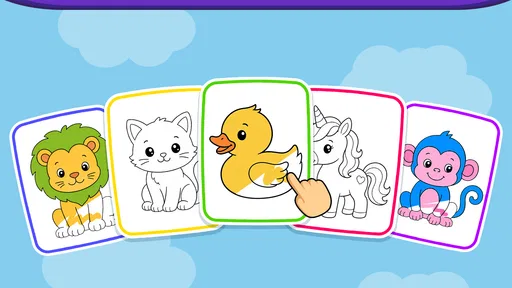
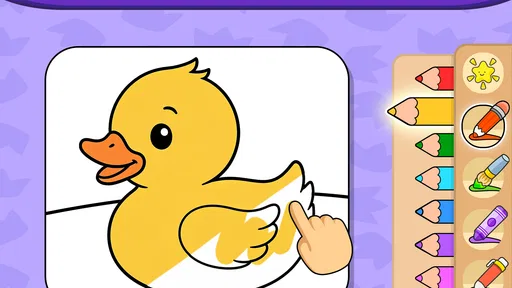
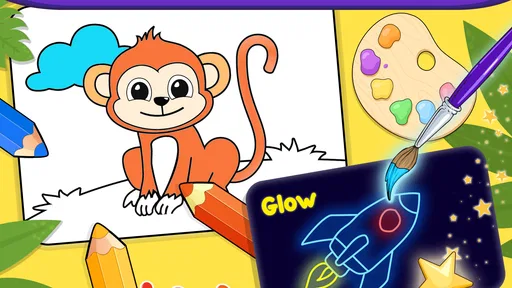
Imagine a world where your toddler can color outside the lines without leaving a permanent mark on your living room walls. That's exactly what Coloring games for kids: 2-5 y offers. The app boasts a vibrant palette that allows kids to explore their artistic side freely. With a simple tap, they can choose from a rainbow of colors that would make any budding artist giggle with joy.
Easy Peasy User Interface
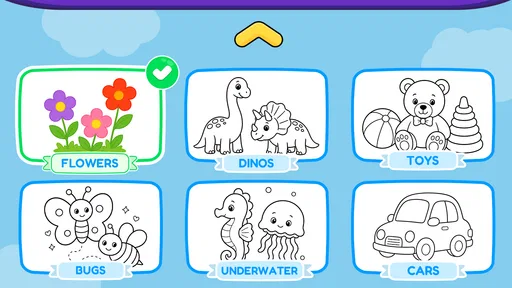
Let's talk about its interface because, let's face it, if it confuses us adults, our kiddos won't stand a chance. Thankfully, this app keeps it straightforward. The icons are large and intuitive, making it easy for tiny fingers to navigate. Even if your child hasn't quite mastered the art of reading, they'll have no trouble diving into their coloring adventures.
For a toddler, a simple interface is not just a convenience: it changes how the activity works. If I have to keep taking the device back to find a button, the child stops drawing and the session becomes mine rather than theirs. I’d still sit nearby at first, though. A short demonstration of how to choose a color and move between choices can prevent frustration, while also showing whether the child can use the controls comfortably on that particular screen.
One practical way to make the activity more engaging is to give a small prompt instead of asking, “What do you want to do?” A question like “Which color would you use for the bus?” gives a young child an easy starting point without dictating the whole picture. I’d let them choose an unexpected color, too; the point is exploration, not producing a picture that looks realistic.
Worth Reading Before You Choose

Flipboard Shows What News Apps Must Do Beyond the Feed

Switching to Android Auto Means Rethinking Your Driving Routine

Google Calendar Makes a Crowded Week Easier to Manage

Ludo King Makes the Most of the Minutes Between Plans

Baby Panda World Brings Quick Play to Modern Phones, but Its Game Library Feels Busy

ESPN’s Live Game View Makes Following Close Games Easier
Little reactions, longer conversations
Each drawing is accompanied by cute animations and sound effects that bring their creations to life. I found myself smiling as my niece giggled at the whimsical noises her coloring made. It's these little details that make the app engaging, keeping the little ones entertained while sneaking in a bit of education.
Those responses can be useful, but they also shape the mood of a session. A child who enjoys immediate visual and audio feedback may find digital coloring more inviting than a blank sheet of paper. If the sounds become distracting during a quiet moment, I’d lower the device volume or choose a different activity rather than expect the child to ignore effects that are designed to catch their attention.
Educational Value
Speaking of education, while the primary goal is fun, there's a subtle learning aspect woven into the app. Kids are not only honing their motor skills but also learning about colors, shapes, and coordination. It's like sneaking veggies into their favorite meal—sneaky, but oh-so-effective!
I’d think of those benefits as practice, not a substitute for hands-on play or a structured lesson. Tapping a color and moving through a drawing can help a child practise choosing and coordinating, but crayons, blocks, and conversations offer different experiences. A useful routine is to connect what appears on screen to something nearby: after coloring an animal, ask what it eats or where it might live. That turns a brief digital activity into a chance to talk, rather than treating the game as a teaching tool that must do everything by itself.
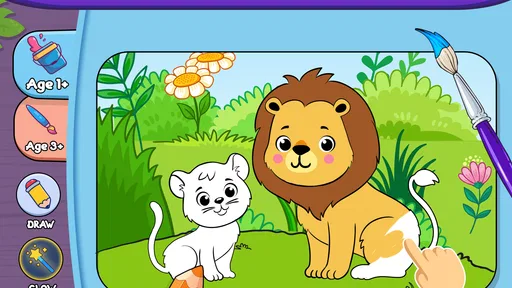
Additionally, the app features different themes and categories, from animals to vehicles, which can be a fantastic conversation starter. It’s a chance to talk about their favorite animals or what sound a tractor makes, turning screen time into quality bonding time.
Where it fits into an ordinary day
I can see this being useful during a short wait at a café, while a parent finishes a necessary task at home, or on a journey when carrying crayons and paper would be inconvenient. For example, before a meal arrives, I might let a child choose a vehicle drawing, then ask them to point out its colors and describe where it is going. That gives the child something focused to do while keeping an adult involved, rather than handing over a phone and expecting the game to manage the whole moment.
For longer outings, I’d keep expectations modest. A coloring game can occupy a child for a while, but it is not a guarantee of uninterrupted quiet, and the device itself still needs supervision. If a child is tired, hungry, or already overstimulated, another round of bright sounds and choices may not help. I’d use it as one option in a small set of activities, not the default answer whenever a toddler is bored.
How it compares with paper and other kids’ games
Compared with paper coloring, this is neater and easier to bring along: there are no loose crayons to collect and no marks on the table. The trade-off is that a touchscreen does not provide the same grip practice, material feel, or open-ended freedom as physical art supplies. I’d alternate between the two, especially for a child who enjoys drawing beyond filling in ready-made pictures.
It also occupies a different space from broad preschool learning apps. A focused coloring game is easier to explain and may be less demanding than an app that moves between several kinds of activities, but it is not the right pick if you want a wide range of lessons or a more structured learning path. I would choose it for a simple creative break, and choose books, toys, or a broader educational activity when the goal is sustained teaching or variety.
Age, device fit, and sensible supervision
This is an educational game from Bebi Family: preschool learning games for kids, intended for young children and carrying an Everyone content rating. It was released on Dec 25, 2020, and its current version is 1.07.07, with Android 6.0 as the minimum operating system. Those details are useful when checking whether an older device can run it, but an age label cannot tell you whether a particular child is ready to navigate a touchscreen independently. I’d try it together first and see how the controls and pace suit them.
Its reach suggests that many families have tried it: it has over five million installs and an average rating of 4.4 from around thirty-one thousand ratings, alongside about three and a half thousand written reviews. I’d treat that as context, not proof that every child will enjoy it. A toddler who likes coloring and responds well to touch controls may settle into it quickly; one who prefers physical materials or becomes absorbed by screen effects may be happier with another activity.
What “no ads” does and doesn’t settle
The game’s short description presents it as having no ads, which is reassuring for a child-focused activity. Still, that is distinct from the purchase question: in-app purchases are available, so ad-free should not be read as meaning that every option is included at no cost. I’d make the purchase decision myself and keep the device’s controls appropriate for a young child.
The original article’s claim that there are no in-app purchases and that the game works without an internet connection should not guide a buying decision. Purchases are part of the current offering, and I would not rely on offline access unless I had checked it on the device. If uninterrupted use matters for a flight or a trip through an area with poor reception, testing the exact setup beforehand is a sensible precaution.
Who is likely to get the most from it?
I’d recommend trying it if you want a straightforward coloring activity for a preschooler, particularly when portability and easy cleanup matter. It may suit a child who likes selecting colors, watching a picture respond, and talking with an adult about familiar things such as animals or vehicles. The free download also makes an initial trial possible without committing to a purchase, though families should keep the in-app options in mind.
I’d skip it if you specifically want a fully free experience with no paid choices, a drawing tool that encourages freehand art, or a broad curriculum with guided lessons. It may also be a poor fit for a child who gets frustrated by touchscreens or finds visual and sound effects too stimulating. In those cases, paper and crayons, a picture book, or a less interactive activity could be the better choice.
My take for families deciding
As an educational game in the preschool coloring niche, this is best judged as a convenient creative activity rather than a complete learning solution. Its appeal is the low-effort way to offer a child a color-and-draw moment, with themes that can lead into conversation. Its limits are just as practical: digital coloring does not replace physical art, a focused activity does not provide the range of a broader learning app, and purchases mean the free download is not the same as a promise that everything costs nothing.
My advice is to try the free version together, watch how your child handles the controls, and decide whether the experience is worth keeping before paying for anything. If it becomes a useful option for waiting rooms or quiet moments, great; if your child loses interest quickly, there is no need to turn it into a routine. That is the kind of modest, realistic value I’d want from a toddler coloring game.
Safety First
As a concerned guardian, I appreciate that the app is designed with safety in mind. There are no pesky ads or in-app purchases that could lead to unexpected charges. Once you've downloaded it, you can hand over your phone without worrying about any surprises on your next bill.
It’s also worth mentioning that the app doesn't require an internet connection, which is a blessing during long car rides or when you're out and about. Your child can enjoy endless coloring fun without draining your data.
In a nutshell, Coloring games for kids: 2-5 y is a lifesaver for busy parents seeking a safe and educational app for their little ones. It's a win-win, giving them a creative outlet while providing you with a few moments of peace. If you're ready to see your child's face light up with excitement, this app is definitely worth a download.
Pros
- Engaging and colorful interface.
- Easy-to-use for young children.
- Wide variety of coloring pages.
- Promotes creativity and motor skills.
- No in-app purchases needed.
Cons
- Limited features in the free version.
- Ads may interrupt gameplay.
- Some images are too complex.
- Requires internet for full features.
- Limited parental controls.
FAQs for Coloring games for kids: 2-5 y
What age group is "Coloring Games for Kids: 2-5 y" suitable for?
"Coloring Games for Kids: 2-5 y" is designed specifically for toddlers and preschoolers, aged 2 to 5 years old. The app's content is tailored to support early development skills, using vibrant colors and simple designs that are easy for young children to engage with and understand.
Is "Coloring Games for Kids: 2-5 y" safe for children to use?
Yes, the app is designed with child safety in mind. It is free from ads that might redirect children to external sites and does not contain any in-app purchases that could be accidentally accessed. Additionally, all content is age-appropriate and focuses on educational value.
What educational benefits does "Coloring Games for Kids: 2-5 y" offer?
The app helps develop fine motor skills, color recognition, and creativity. It encourages children to experiment with colors and shapes, enhancing their cognitive skills. The interactive elements also promote hand-eye coordination and concentration, making learning fun and engaging.
Does "Coloring Games for Kids: 2-5 y" require an internet connection?
No, "Coloring Games for Kids: 2-5 y" does not require an internet connection for most of its features. This allows children to enjoy the app on the go, without the need for Wi-Fi or data, making it perfect for travel or areas with limited connectivity.
How user-friendly is the interface of "Coloring Games for Kids: 2-5 y"?
The interface is designed with simplicity and ease of use in mind. It features large buttons and intuitive navigation that young children can easily understand. The app's layout is straightforward, minimizing the need for parental guidance and allowing kids to explore independently.


